
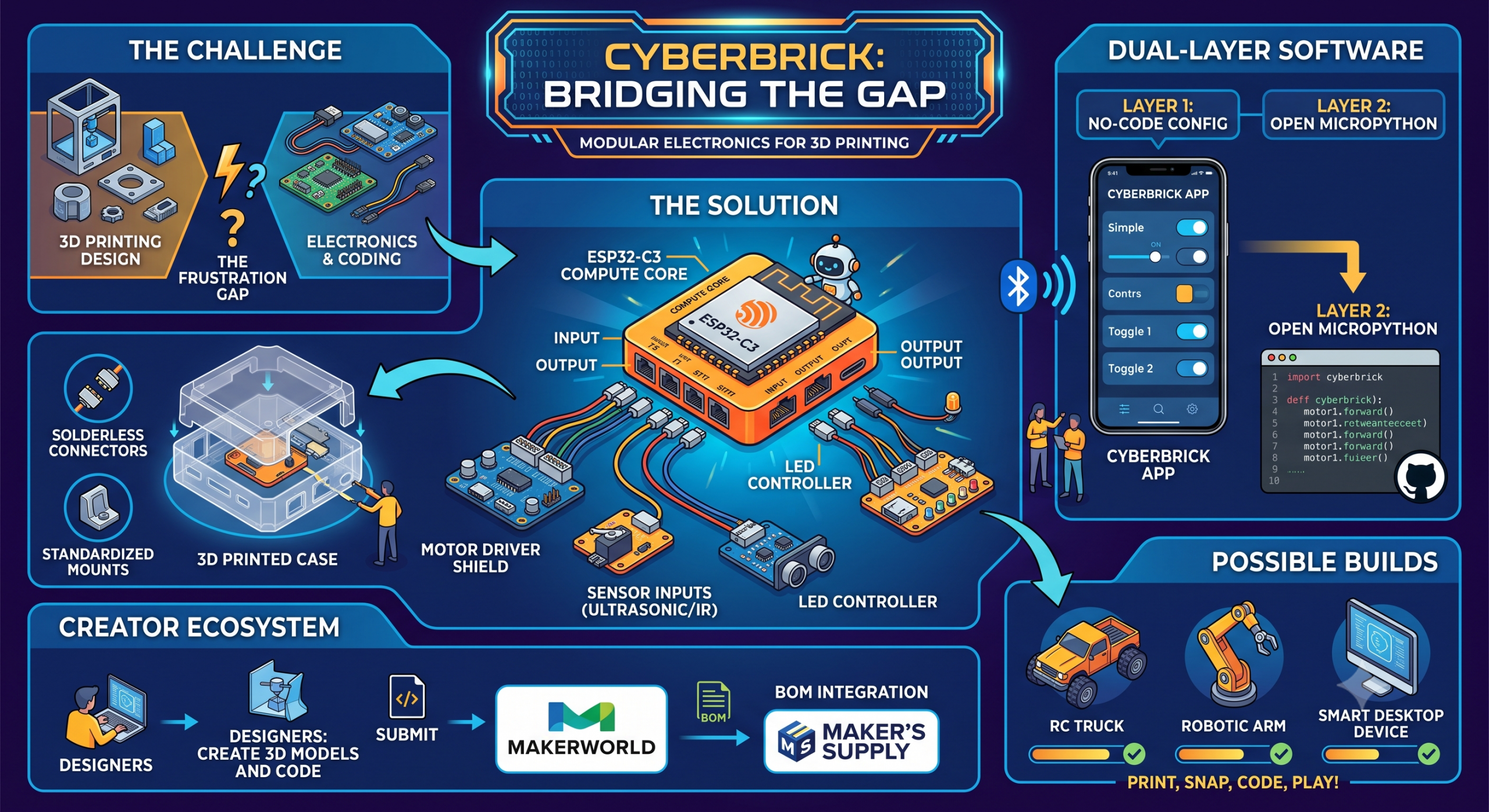
For years, the DIY maker movement has operated in two parallel universes. On one side sit 3D printing enthusiasts, capable of fabricating complex mechanical joints, custom chassis, and sleek aesthetic enclosures in a matter of hours. On the other side reside hardware tinkerers, soldering ESP32 microcontrollers, debugging breadboard wires, and writing C++ firmware.
When these two worlds meet, the result is magic—interactive RC vehicles, robotic arms, smart home gadgets, and desktop productivity tools. Yet, for many makers, crossing the chasm between mechanical printing and electronic engineering has felt like scaling a cliff. Breadboard connections shake loose inside printed shells, custom wiring harnesses take hours to solder, and firmware configuration turns a fun weekend build into an endless debugging session.
Enter CyberBrick, Bambu Lab and MakerWorld’s flagship modular smart toy and robotics ecosystem. Designed to seamlessly combine programmable hardware, solderless electronic modules, open 3D design specifications, and dual-layer coding, CyberBrick is positioned to do for 3D-printed robotics what LEGO Technic did for physical building blocks.
Here is an in-depth look at what CyberBrick is, how its architecture works, why it is reshaping the MakerWorld community, and how you can get started with your own builds.
1. The Core Philosophy: Bridge the Gap Between Plastic and Pixels
At its core, CyberBrick solves the single biggest bottleneck in home robotics: hardware-software integration. Traditionally, if a designer created a cool 3D-printed RC car on MakerWorld, anyone attempting to build it had to source a specific ESC (Electronic Speed Controller), a matching receiver, a battery management system, servos, and custom switches, all while figuring out how to stuff wires into tight cavities.
CyberBrick reimagines this by standardizing the electronics layer. By partnering with Bambu Lab’s Maker’s Supplyinfrastructure, CyberBrick provides a plug-and-play toolkit of standardized microcontrollers, motor drivers, sensor modules, and power solutions.
3D designers no longer have to design around unpredictable, off-the-shelf components. Instead, they build around standardized CAD specs and reference mounts. Builders can simply print the structural chassis, snap in standard CyberBrick modules, flash the firmware over Bluetooth or a mobile app, and immediately begin playing or customizing.
2. Anatomy of the Hardware: Standardized, Modular, Solderless
The magic of CyberBrick lies in its modular hardware design. Rather than forcing makers to pick up a soldering iron, the system uses standardized connectors, pre-wired shields, and snap-fit mounting footprints.
The Brain: ESP32-C3 Compute Core
At the heart of the ecosystem is a wireless compute unit based on the ESP32-C3 chip. This low-power, high-performance microcontroller brings built-in Wi-Fi and Bluetooth capabilities. The compute module interfaces directly with two core shield configurations:
- The Remote/Actuator Shield: Designed to sit inside the vehicle, robot, or device. It features dedicated ports for dual DC motors, servo channels, and multi-channel LED lighting outputs.
- The Controller Shield: Designed for human-machine interfaces (HMIs). It maps input signals through digital and analog ports designed to accept 2-axis joysticks, toggle switches, pushbuttons, and potentiometers.
Solderless Expansion Modules
Beyond simple RC driving, CyberBrick supports an expanding ecosystem of plug-and-play functional modules available via Maker’s Supply. These include:
- Actuators: Micro-servos, high-torque geared motors, and specialized stepper drivers.
- Sensors & Inputs: Ultrasonic distance sensors, line trackers, ambient light sensors, and physical switches.
- Outputs & Displays: Mini OLED screens, custom LED strips, and audio buzzers.
Because every module utilizes standard connector pinouts and shared logic, the hardware you purchase for an RC Forklift today can be repurposed into a smart desktop weather station tomorrow.
3. Dual-Layer Software: Accessibility Meets Unlimited Depth
Hardware is only half the battle; software is usually where beginners get stuck. CyberBrick addresses this by offering a dual-layer software architecture, catering to absolute beginners and veteran programmers alike.
+-------------------------------------------------------------------+
|                     CYBERBRICK SOFTWARE STACK                     |
+-------------------------------------------------------------------+
|  LAYER 1: App-Based Configuration (No-Code / Plug-and-Play)      |
|  • Instant Bluetooth firmware flashing via MakerWorld App         |
|  • Pre-built UI layout for joysticks, switches, & telemetry       |
|  • One-click pairing between controller & target device           |
+-------------------------------------------------------------------+
                                  │
                                  ▼
+-------------------------------------------------------------------+
|  LAYER 2: Open MicroPython & GitHub Ecosystem (Full Customization) |
|  • Direct code editing for custom logic & automation routines    |
|  • Full access to underlying ESP32-C3 GPIO pins & communication    |
|  • Community-driven open-source code repositories                 |
+-------------------------------------------------------------------+
Layer 1: App-Based Configuration (No-Code Setup)
For users who want a seamless “print and play” experience, the CyberBrick Mobile App handles the heavy lifting. When you download a CyberBrick-verified model on MakerWorld, the app automatically pulls the corresponding control scheme and firmware.
- Pair your smartphone or CyberBrick remote to the target model via Bluetooth.
- Upload the pre-configured firmware profile with a single tap.
- Instantly drive, steer, or operate your creation using a digital touch interface or a physical 2.4 GHz controller.
Layer 2: MicroPython & Open-Source Code
For makers looking to push the boundaries, CyberBrick provides full open-source access via MicroPython. Creators can write custom automation logic, program autonomous sensor-driven routines, or rebind inputs directly through official GitHub repositories and developer tools.
Whether you want to build a self-balancing robot, an automated candy dispenser, or an interactive mechanical clock, MicroPython grants complete control over every pin and peripheral.
4. The Creator Ecosystem: Creator Commissions and Badging
MakerWorld isn’t just releasing hardware; they’ve built a sustainable ecosystem designed to reward 3D designers who contribute to the CyberBrick universe.
| Feature / Program | Description & Maker Impact |
| Open CAD Reference Models | Bambu Lab provides downloadable STEP files and dimensional specifications for all CyberBrick electronics, enabling designers to build precise snap-fit models. |
| BOM Integration | Every CyberBrick model published on MakerWorld automatically generates a dynamic Bill of Materials (BOM) linking directly to Maker’s Supply parts. |
| Affiliate Commissions | Creators earn higher commission rates on CyberBrick parts compared to standard Maker’s Supply components when users buy parts through their model pages. |
| CyberBrick Verification | Popular models uploaded to MakerWorld enter a verification queue where top builds are physically printed, assembled, and tested by MakerWorld to receive an official “CyberBrick Verified” badge. |
This closed loop creates a win-win scenario: designers are incentivized to engineer complex, functional models, and makers get access to guaranteed, high-quality projects with hassle-free hardware sourcing.
5. What Can You Build? Showcase Projects
The versatility of CyberBrick is best demonstrated by what the community and pilot creators are already building:
                     ┌──────────────────────────────┐
                     │   CYBERBRICK BUILD REALM     │
                     └──────────────┬───────────────┘
                                    │
       ┌────────────────────────────┼────────────────────────────┐
       ▼                            ▼                            ▼
┌───────────────┐           ┌───────────────┐           ┌─────────────────┐
│   RC TOYS &   │           │   COMPLEX     │           │  SMART GADGETS  │
│   VEHICLES    │           │  MACHINERY    │           │  & PRODUCTIVITY │
└──────┬────────┘           └──────┬────────┘           └────────┬────────┘
       │                           │                             │
       ├─ RC Heavy Trucks          ├─ Multi-Axis Cranes          ├─ Desk Clocks
       ├─ Construction Excavators  ├─ Robotic Arms               ├─ Macro Pads
       └─ Tracked Tanks            └─ Automated Conveyors        └─ Weather Hubs
- Heavy Machinery & RC Vehicles: From multi-axle construction trucks to tracked tanks and forklifts, makers are building functional RC machines complete with working steering, articulated booms, and lighting packages.
- Industrial Scale Models: Pilot designers have showcased intricate scale models, such as working Tower Cranes that utilize multi-channel motor controls to lift, rotate, and traverse loads smoothly.
- Interactive Display Bases: Designers are creating dynamic display stands—for example, sci-fi vehicles with motorized wheel transformations (switching from drive mode to flight mode) controlled via physical switch consoles on the base.
- Desktop Productivity: Beyond toys, CyberBrick powers smart macro pads, motorized phone mounts, custom status displays, and ambient LED controllers.
6. Step-by-Step: How to Get Started with Your First Build
Ready to dive in? Here is the typical workflow for bringing a CyberBrick project to life:
1.Select Your Project on MakerWorld:Choose a Verified Model.
Browse MakerWorld’s dedicated CyberBrick section or filter by the “CyberBrick Verified” badge. Look for a project that matches your skill level and interest, whether it’s a simple motorized gadget or a complex RC vehicle.
2.Order the BOM via Maker’s Supply:One-Click Sourcing.
Check the model’s integrated Bill of Materials (BOM). Click to add the required CyberBrick modules, motors, servos, and fasteners directly to your Bambu Lab cart.
3.Print the Structural Components:Follow Included Print Profiles.
Download the designer’s optimized print profile. Print the parts using recommended materials (PLA for general structures, TPU for tires or flexible grips, and PETG for high-stress gears).
4.Snap In the Electronics:No Soldering Required.
Assemble the mechanical frame following the designer’s assembly guide. Route pre-cut wires and snap the ESP32 compute unit, motor shield, and actuators into their designated printed slots.
5.Flash Firmware and Play:App-Based Setup.
Open the CyberBrick Mobile App, connect via Bluetooth, and flash the target firmware profile. Calibrate your joystick or control switches, and your custom creation is ready to operate!
The Future of CyberBrick and 3D Printed Robotics
CyberBrick represents a fundamental shift in desktop manufacturing. By lowering the friction between mechanical design and electronic implementation, Bambu Lab and MakerWorld are empowering a new generation of creators to build functional, intelligent hardware right at home.
As the ecosystem grows, expect to see richer sensor integrations, autonomous navigation capabilities, expanded MicroPython libraries, and an ever-growing library of community-designed blueprints. Whether you are a parent looking for an engaging STEM project with your kids, a hobbyist seeking custom RC builds, or an engineer prototyping desktop devices, CyberBrick gives you the tools to print, snap, and code your ideas into reality.